> For the complete documentation index, see [llms.txt](https://docs.meteofivem.net/llms.txt). Markdown versions of documentation pages are available by appending `.md` to page URLs; this page is available as [Markdown](https://docs.meteofivem.net/packages/meteo-v2-package/how-to/how-to-fix-server-list-query-error.md).
# How to Fix Server List Query Error
Fix the "Server list query returned an error" issue so your server shows up in the FiveM server list.
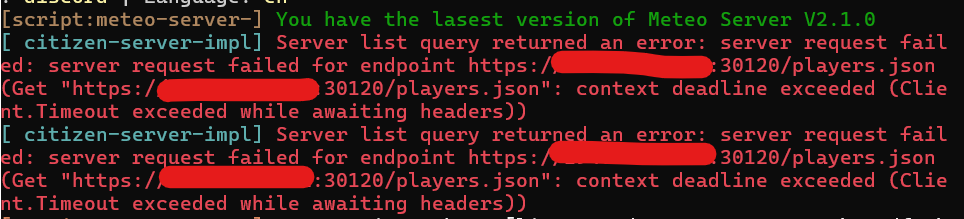
If you see `[citizen-server-impl] Server list query returned an error` in your console, your server cannot be reached by the FiveM master server and will not show up in the public server list.
***
### Step 1: Set sv\_listingIPOverride
1. Open your `server.cfg` file.
2. Look for the setting `sv_listingIPOverride` and ensure it is set to your server's IP address with the port number.
```
sv_listingIPOverride "your_ip:30120"
```
3. Save the changes.
This resolves the error in most cases.
***
### Step 2: Open Required Ports
If the error persists after Step 1, the most common cause is misconfigured firewall or router. You need to open the following ports:
* **30120 TCP/UDP** - FiveM server
* **40120 TCP** - txAdmin
How you open ports depends on your setup (Home Host, Windows VPS, Linux VPS, or Game Server Provider). Check your host's documentation or firewall settings.
***
### Step 3: Update FiveM Artifacts
Outdated server artifacts can also cause this issue. Make sure you are running the latest recommended FiveM artifacts:
* Windows: [FiveM Windows Artifacts](https://runtime.fivem.net/artifacts/fivem/build_server_windows/master/)
* Linux: [FiveM Linux Artifacts](https://runtime.fivem.net/artifacts/fivem/build_proot_linux/master/)
***
### Step 4: Remove sv\_master1
Make sure you do **not** have `sv_master1` set in your `server.cfg`. This setting is deprecated and can cause issues.
***
### Step 5: Check Your Hosting
If you have done all of the above and the issue is still not fixed, this is most likely a hosting provider issue. Some cheap or unknown hosts have networking restrictions that block the FiveM master server from reaching your server.
{% hint style="warning" %}
Always use well known hosting providers. Cheap or unknown hosts often have networking issues that cause this error and other connectivity problems.
{% endhint %}
***
{% hint style="success" %}
**Still stuck?** Open a ticket on our official Discord at [discord.meteofivem.net](https://discord.meteofivem.net) and our team will help you out.
{% endhint %}